
Samsung WF42H5200AW/A2 Washing Machine Won't Drain After Wash Cycle
My Samsung WF42H5200AW/A2 Washing Machine won't drain after wash cycle. Low humming sound like it's trying to drain but nothing happens. Side note - thank your for your videos. Helpful when bearings needed replaced as well as the spider arm.
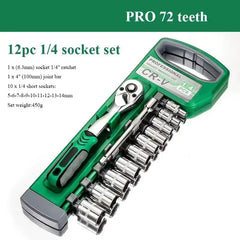
Tools Required


Hi Tara,
Sorry to hear about the problem regarding your Samsung WF42H5200AW/A2 Washing Machine.
First off, a massive well done on replacing the bearings and the spider arm yourself! That is easily one of the biggest, most involved jobs you can do on a washing machine, so I am really glad the videos helped you save the machine. After tackling a rebuild like that, sorting out a drainage issue will be a walk in the park for you.
That low humming sound you are hearing is actually a very good clue. It tells us that the main circuit board is doing its job and sending power down to the drain pump, so you do not have a major electrical or board failure. Instead, the pump motor is physically trying to spin, but either something is jamming it or the motor itself has worn out.
Before you take the machine apart, start with the simplest checks first. Make sure the machine is unplugged, then use the small black emergency drain hose with the bung at the bottom front to empty the standing water out into a shallow tray. Once it is empty, unscrew the pump filter and have a good look inside for coins, hairpins, or trapped lint. Reach in with your finger and give the little plastic impeller blades a spin. Because it is a magnetic pump, it should turn freely with a slight magnetic clicking feel to it. It is also well worth checking your waste hose and the plumbing connection under your sink, just to make sure a hidden blockage there isn't stopping the water from getting out.
If the filter is completely clear and the impeller isn't jammed, yet the pump still just sits there humming without shifting any water, the pump motor itself has failed. Over time, the internal windings in these pumps can become weak or the shaft wears out, meaning the pump might still buzz—and even pass a basic electrical test—but it simply doesn't have the strength left to spin under the load of the water.
To replace the pump, keep the machine unplugged and strip down the front just like you did for your bearing job. Take off the top lid, remove the soap drawer and the fascia panel (remembering to keep those two stainless steel screws inside the soap drawer area separate so they go back in the right place), unclip the retaining spring band around the door seal, undo the door interlock, and lift the front panel away. While you have the pump exposed, it is also worth taking off the large black sump hose running from the bottom of the drum to the pump to make sure a stray sock or piece of debris isn't lodged in there.
When you fit the new pump, mark the housing before you take the old motor off so you can line the new one up in the exact same position, and put a tiny smear of Vaseline around the rubber seal so it slides in cleanly without pinching. Once you have everything bolted back together, slip a sheet of dry newspaper underneath the machine before running your first test cycle. That way, if there is even the tiniest drip from one of the hoses, you will spot it immediately on the paper.
I strongly recommend watching our Samsung pump replacement video below fully at before you pick up your tools. It walks you through the exact teardown, how to check the hoses, and a few handy tricks for getting that door seal spring band back on without damaging the rubber. Just make sure you use your full model number, WF42H5200AW/A2, when ordering your replacement pump so you get the exact match.
Hope this gets your machine draining smoothly again in no time! Feel free to reach out if you hit any snags along the way.
All the best,
Parts for This Model
Showing compatible parts for model WF42H5200AW/A2