
Indesit dif04 Dishwasher Flashing start button and buttons 1&2
The first time it happened the machine just ran the pump for about 10 minutes then beeped. It is draining as I filled the drain from a jug and it always drains. Opened the door, flashing lights. Start button and buttons 1&2. I turn it off, shut the door, but the pump starts running again, without a programme selected. I cleared the whole drainage system under the sink to eliminate blockages. Turned the machine off for half an hour and all seems well, as in it doesn't start on it's own. I selected Eco mode and the pump ran for 10 seconds, after 20 seconds it started filling. All seemed to be running as it should until... After about an hour, and what I assume was the first drain, the fault lights flashed. The machine had drained. Once in fault mode, again it starts as soon as I shut the door even when a cycle isn't selected. I have the left hand side of the machine off and can see it filling. I also have the bottom tray off in case the float was sticking. The beeps are sometimes a tad distorted, then go back to sounding clear. Cheers
Tools Required

Hi Lloyd,
Thank you for providing such a detailed breakdown of what is happening with your Indesit dif04 dishwasher. Eliminating the drainage system under the sink and taking the side panels off are excellent first steps. Because you have systematically ruled out a standard blockage, we can look directly at the machine's internal safety systems and heating cycle to figure out exactly what is going wrong.
Let's break down the two main symptoms you are experiencing: the continuous pumping and the delayed fault during the cycle.
1. The Continuous Pumping: The Anti-Flood System
You mentioned that the pump runs for 10 minutes, and once the machine goes into fault mode, the pump starts running again the second you shut the door—even without a programme selected.
Lloyd, this is a classic safety override. When a dishwasher does this, it is usually because the anti-flood device has been activated. The machine is designed to force the drain pump on continuously to prevent your kitchen from flooding, and it will ignore all other commands until this safety circuit is reset.
You noted that you took the bottom tray off in case the polystyrene float was sticking. While removing the tray drops the float, you still need to investigate the microswitch that the float activates.
-
The Microswitch: The switch itself could be stuck in the "activated" position, or there may be a wiring fault/short circuit leading up to it.
-
The 'Why': Even with the physical float removed, if the machine's control board receives a closed circuit from that switch, it will blindly protect the kitchen and run the pump.
2. The One-Hour Fault: Is the Machine Heating?
The second major clue is that you selected the Eco mode, it filled, and ran fine for about an hour before the lights flashed.
You didn't mention if the machine actually got hot during this time, but the one-hour mark is critical. This is typically the point in the cycle where the machine waits for the water to reach a specific temperature before it continues.
-
Heating Timeout: If the element is broken or not receiving power, the machine will wash with cold water for a predetermined amount of time. Eventually, the control board realizes the temperature isn't rising, gives up, drains the water, and throws an error code (often represented by specific flashing lights, like buttons 1 & 2).
-
Earth Leakage: A faulty heating element can also develop a slight earth leakage. This happens when water breaches the element's internal insulation. It doesn't always trip your house electrics immediately, but it sends a tiny amount of rogue voltage through the machine.
3. The Distorted Beeps
You also mentioned that the warning beeps are occasionally distorted. While it could just be a failing piezo buzzer on the circuit board, distorted audio is frequently a symptom of an electrical gremlin. An earth leakage from a faulty heater, or a tiny bit of moisture on the main printed circuit board (PCB), can drag the voltage down just enough to cause the processor to glitch and the speaker to sound "scratchy" or distorted.
Next Steps for Lloyd
To get your Indesit back up and running, here is what you need to test next:
-
Test the Heater: Unplug the machine, locate the heating element, and use a multimeter to test it for continuity. You should get a reading of around 25 to 30 ohms. More importantly, test it for earth leakage (check for continuity between the element terminals and the metal earth casing of the heater).
-
Check the Water Temperature: If you manage to get it to run another cycle, carefully pause it after 30 minutes, open the door, and feel if the water is actually getting hot.
-
Test the Anti-Flood Switch: With the multimeter, test the anti-flood microswitch to ensure it clicks cleanly and properly opens and closes the circuit.
Manufacturers build these fault codes in to point us in the right direction, but understanding why the machine reacts the way it does is the key to a permanent fix. Check that heater and the microswitch, Lloyd, and you will likely find the culprit.
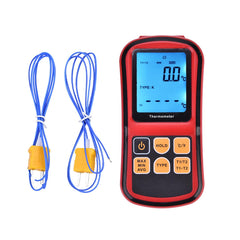
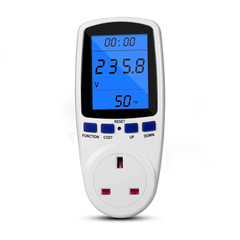
I’ve also added a couple of multimeters. One meter helps check if the heating system is on or off. It also records how much electricity an appliance uses during a full cycle. It’s great for finding problems.
Parts for This Model
Showing compatible parts for model DIF04